






medical outcomes
QL-Recorder?

Evolution of technology
Crash course: Concept • Technology • Live Demo
2022: AnyQuest for Javascript as Web-Application - A pre-configured QL-Recorder-Server as Virtual Appliance
|
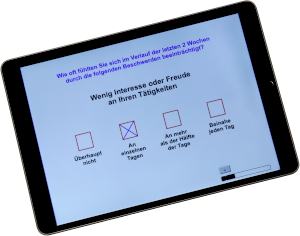
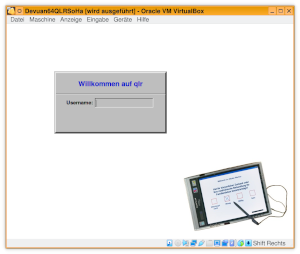
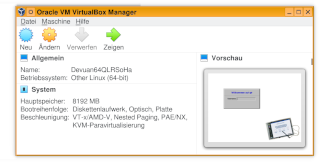
AnyQuest for Windows can be deployed natively or via Remote Desktop Clients on various devices. Version 4.00 improves dialog rendering with Wine under Linux. The new AnyQuest for Javascript now offers the core functionality as Web-Application ("App") on mobile phones, Apple iPads, Android-Tablets, PCs and Macs. The new QLR-Server now provides a complete pre-configured backend for both systems - as disk-image or virtual appliance für Oracle Virtualbox or VMware. It includes a Linux-System with webserver and AnyQuest for Javascript as Web-Application, an RDP/VNC/X11 terminal server with AnyQuest for Windows, firewall, file server, print server and virtual PDF-printer, optional SQL data base with web-frontend for AnyQuest Server, plus connectivity and integration with automatically generated PDFs, optional HL7, FHIR and GDT/LDT interfaces with user-accounts for SSH/SFTP, and scriptable on demand tabular reports. Basic operation in a given IT environment can be achieved within minutes, and further integration in very short time. Thus, electronic questionnaires can be provided locally or via the WWW on a large variety of devices. Results from questionnaire administrations can then be transferred to a clinical information system in graphical form - or automatically created tabular reports can simplify the regularly required data provisions to quality assurance initiatives - with increased completenes of data and reduced overall costs, compared to paper questionnaires. Here is an exemplary setup in the WWW with several questionnaires, PDFs with graphical results, and a tabular report available for download on demand. |
|
2009: Lilly Quality-of-Life Prize
|
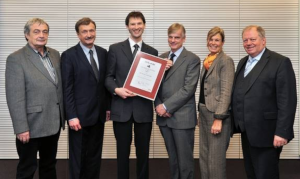
Driven by personal imagination and user requirements, features and configurability of the software, as well as support tools and available documentation have grown. The platform offers a library of electronic questionnaires. Publications from scientific studies support its clinical usability and validity. The original conception of the Quality-of-Life Recorder, its continued development and support of application projects over years were awarded the Lilly Quality-of-Life Prize 2009 - Thank you for this great feedback and motivation! |
2008: AnyQuest Server and facilitated paper questionnaire processing
Complementing AnyQuest for Windows, a server backend was completed (based upon original work from about 1999).
The current standard implementation is based upon Linux, Apache, MySQL and Perl, but can be adjusted upon request to work on other platforms and using other SQL databases as well (Interbase, PostgreSQL, MaxDB, Oracle, DB2 etc.). It accepts result files which can be sent either automatically after each questionnaire administration, or in batch mode.
An alternative configuration where a MySQL database server and all locally required configurations of AnyQuest for Windows reside together on a single computer (under Windows or Linux) is also available. It combines immediate automatic storage of questionnaire results and meta-information in a SQL database with minimal hardware requirements and extremely easy setup.
Security, performance, flexible support of any questionnaires, and easy configuration were major goals in AnyQuest Server development. It can produce its own evaluations and present them via a multifunctional and customizable WWW interface. Or it can serve as live repository for analysis performed e.g. using SAS or SPSS. This may be an interesting option for users who want to set up an advanced multicenter study group and/or perform repeated complex analyses.
A new fast-input-form mode has been added to AnyQuest for Windows, to support paper questionnaire processing for validation studies, or for emerging distributed research groups just beginning with QoL measurement. It may remove one obstacle for candidate users who do not want to or cannot provide electronic questionnaires to every patient.
2007: Netbooks - Asus EeePC, UltraMobile PC
Various new Tablet-PCs, the Asus EeePC and various UltraMobile PCs result in prices for pen-computers and touch-screen equipped computers with full MS Windows support declining below 1000 Euro. Wireless LANs and laser printers become quite common in clinical settings, and so does knowledge about how to set up and maintain networked computing environments.
AnyQuest for Windows has been found to work under Microsoft Windows Vista (just as fine as on Windows 3.x, Windows 9x, Windows ME, Windows NT 3.x, Windows NT 4, Windows 2000, Windows XP, Wine or MS Windows in VMware under Linux, or SoftWindows under Irix).
2005: Microsoft's Tablet-PCs, BMBF funding for a QL-Recorder application
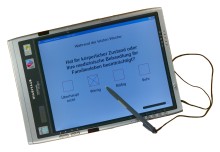
Microsoft have announced the Tablet-PC and improved pen support and handwriting recognition in their Windows XP operating system. The selection of available hardware has also improved: the image to the right shows a Fujitsu-Siemens Stylistic ST5020 with the eQLQ, an electronic version of the EORTC QLQ-C30.
|
A study was started at the Department of Family Practice of the University of Goettingen, in which the QL-Recorder is used in 25 general practices, funded by the BMBF (German Ministery of Education and Research). Within this study, the interface of the QL-Recorder within German practice management systems via the xDT interface via WLAN (Wireless Local Area Network, GDT tools available on this site) will be adopted to a broader variety of vendors. A poster showing first results of this study has won one of the poster prizes at the 2006 DEGAM scientific meeting. |
|
2001: Continuous improvement based upon user needs
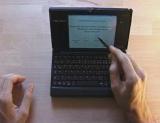
AnyQuest for Windows has been successfully used in a variety of projects. Mini-pen-computers became available at low prices.
|
Dozens of questionnaires in a variety of languages were adopted to the QL-Recorder platform; further information is available in the questionnaire library on this Web-Site. The development of AnyQuest for Java to support on-line questionnaires and additional computer environments was started. A QL-Recorder user won the Quality of Life Prize sponsored by Lilly in 2002. |
1996: Some hardware considerations and AnyQuest for Windows
In 1993 I already had considered to use a pen-computer instead of a PC and a separate digitizing tablet. Available models, however, had low display readability, were slow, and expensive.
|
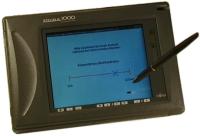
In 1996, fast pen-computers with color-displays, wireless networking technology, multimedia abilities and good support by Microsoft Windows became available. I decided to refine the Quality-of-Life-Recorder, and to support both low-budget hardware (mouse, touch-screen) and most modern interfaces (pen-computer, computer control via EEG analysis). |
 |
The new Quality-of-Life-Recorder featuring AnyQuest for Windows
I started to program this shareware software package in 1996. Much documentation is included, so here are only a few core features:
Universal platform for electronic patient questionnaires, integrated questionnaire editor to let all paper questionnaires go electronic easily, supported answers include discrete, linear scale and free text answers, Windows colors and fonts supported, digitized sound support (talking or musical questionnaire), complex result calculation, immediate configurable printout generation (including longitudinal graphs), easy data export to statistical software, standardized data storage format, multiple concurrent studies on one computer supported, networking support, interfaces to databases, card readers, barcode readers, tumor documentation software, practice management software, clinical information systems...
The software supports a large variety of hardware, but does not need anything special. It seamlessly plugs into your existing computer environment, and patients can fill in electronic questionnaires without training.
To try it out, you can download it from the software library on this Web site.
1993: The original Quality-of-Life-Recorder
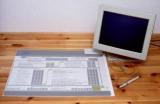
This system was derived from a solution which allowed physicians to operate their practice management software without a keyboard. The graphically designed paper questionnaire lies on a very flat digitizer tablet. Patients use it almost like paper and pencil: They read a question, and mark one of the answers printed next. For patients, this makes no big difference to what they already know, no training is required. The important difference for the researcher is, that a PC immediately processes the answers. Test results are always complete and immediately available.
 |
In a primary study run in 1993 at the University of Ulm, 622 patients of 624 who were asked to use the system, agreed and used it successfully. In a second study in 1994, we could show that routine standardised quality of life assessment is possible for all patients of an out-patient clinic: During 4 weeks, 1120 patients filled in the electronic version of the EORTC QLQ-C30 while only 13 disagreed to participate in the quality of life assessment (not filling in a paper questionnaire either). The resulting compliance was 99%. Together, these were 96% of all eligible patients. Their age distribution resembled the German demographic curve, including patients older than 80 years. |
The system was very well accepted by both hospital staff and patients.


