






medical outcomes
QL-Recorder?

Example 4 out of 12: Simple configuration with pen-computer, infrared-connection, fileserver, printer
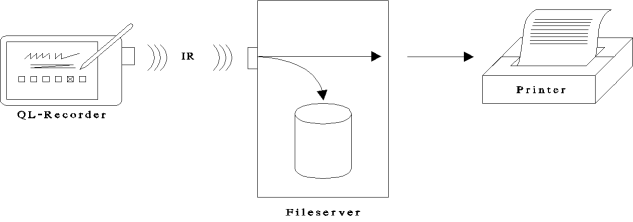
Components and connections
- This configuration consists of a pen-computer with integrated touch-screen, a fileserver and a printer.
- Pen-computer and fileserver are connected via infrared interface (IrDA). Fileserver and printer communicate via parallel port.
Functionality: Interview and result printing
- The patient fills in questionnaires at the pen-computer.
- Stationary use: Using the permanent IR-connection recorded data are transmitted to the fileserver immediately and stored there. No important data (e.g. data of patients or results) remain on the pen-computer.
- Mobile use: During the interviews recorded data are stored on the pen-computer. After returning the pen-computer and reconnecting it to the IR-interface the recorded data are transmitted to the fileserver, stored there and forwarded to the printer.
- The results of the current interview and an overview of the patient's course appear on the printer.
Functionality: Searching and using recorded data
- Using AnyQuery the doctor can search and print data of individual interviews on the pen-computer or on the fileserver.
- Data of multiple interviews can be exported as table to be processed further using other programs.
- Data stored on the fileserver are available on every workstation within the network.


